
User Guide



190-00552-00 Rev. A
Garmin G1000 Pilot’s Guide for the Columbia 350/400
4-1
AUDIO PANEL AND CNS
SECTION 4 AUDIO PANEL AND CNS
This section describes the features and operation of the Audio Panel and COM/NAV/Surveillance (CNS) systems.
The CNS interface includes the COM, NAV, and Transponder.
4.1 AUDIO PANEL DESCRIPTION
The GMA 1347 is an Audio Control Panel and Marker Beacon System. The Audio Panel provides the traditional
audio selector functions of microphone and receiver audio switching. It contains a digital clearance recorder
that continuously captures the last two and one half minutes of selected COM transceiver audio. Recording is
automatic when a COM signal is received. Playback is controlled by pressing the
PLAY
Key. Playback can be
stopped by pressing the
MKR/MUTE
Key.
The unit also includes a four-position intercom system (ICS) with electronic cabin noise de-emphasis and two
stereo music inputs for the pilot, copilot and up to two passengers. The intercom provides four selectable modes
of isolation (All, Crew, Pilot, Copilot).
Pressing the Audio Panel keys controls audio selection of COM, NAV, and intercom. LED annunciators indicate
when a key function is selected.
A speaker output is available for listening to selected aircraft radios on the cabin speaker. MASQ (Master
Avionics Squelch) processing reduces ambient noise from the avionics inputs.
Each microphone input has an automatic squelch threshold. Manual squelch is available for the ICS by pressing
the
MAN SQ
Key.
The unit controls marker beacon receiver audio and features marker beacon audio muting.
As part of the G1000 Integrated Flight Deck, the GMA 1347 also controls the Display Reversionary Mode.
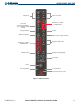
The Audio Panel features controls for three major function groups:
• Communication
• Navigation
• Intercom system (ICS)
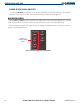
The controls are labeled to indicate the name of the function. The triangular annunciator above each key
indicates when the key function is selected.
The knobs at the bottom of the unit control ICS volume and squelch threshold levels. The small knob adjusts the
volume/squelch level for the pilot. The large knob adjusts the volume/squelch level for the copilot/passenger.
The red DISPLAY BACKUP Button below the volume/squelch knob controls Reversionary Mode selection.