
User Guide




190-00552-00 Rev. A
Garmin G1000 Pilot’s Guide for the Columbia 350/400
2-21
FLIGHT INSTRUMENTS
ANNUNCIATION WINDOW
NOTE: New alerts, regardless of priority, are displayed at the top of the Annunciation Window, separated by
a white line from acknowledged alerts. Once acknowledged, they are sequenced based on priority.
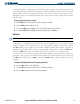
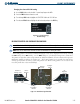
The Annunciation Window appears to the right of the Vertical Speed Indicator and displays abbreviated
annunciation text for aircraft alerts. Text color is based on alert level: warnings appear in red, cautions in yellow,
advisory alerts in white.
SOFTKEY ANNUNCIATIONS
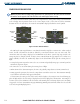
The ALERTS Softkey label changes to display the appropriate annunciation when an alert is issued. The
annunciation flashes and the appropriate aural alert sounds until acknowledged by selecting the softkey. The
softkey then reverts to the ALERTS label, and when selected again opens the Alerts Window to display a
descriptive message of the alert.
Warnings are time-critical and require immediate pilot attention. A flashing WARNING Softkey annunciation
and aural tone (single chime every two seconds) are used to alert the pilot of any warnings. The aural tone
and flashing WARNING annunciator continue until acknowledged by the pilot (by selecting the
WARNING
Softkey).
Caution indicates the existence of abnormal conditions on the aircraft that may require pilot intervention. A
flashing
CAUTION Softkey annunciation and single aural tone (one chime) are used to alert the pilot of any
cautions. The flashing CAUTION annunciator continues to flash until acknowledged by the pilot (by selecting
the
CAUTION
Softkey).
An advisory provides general information to the pilot that may not need immediate attention. A flashing
ADVISORY Softkey annunciation (no aural tone) is used to alert the pilot of any message advisories. The
flashing ADVISORY annunciator continues to flash until acknowledged by the pilot (by selecting the
ADVISORY
Softkey).
Figure 2-29 Softkey Annunciation (ALERTS Softkey labels)