
User Guide




Garmin G1000 Pilot’s Guide for the Columbia 350/400
190-00552-00 Rev. A2-20
FLIGHT INSTRUMENTS
2.4 PFD ANNUNCIATIONS AND ALERTING FUNCTIONS
NOTE:
For a detailed description of annunciations and alerts, refer to Appendix A.
ALERTS WINDOW
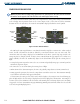
Messages appear in the Alerts Window (in the lower right corner of the PFD) when a warning, caution, advisory
alert, or G1000 message advisory occurs. This window allows system alerts to be displayed simultaneously.
The FMS Knob can be used to scroll through the alert messages. The Alerts Window is enabled/disabled by
selecting the
ALERTS
Softkey.
System alert messages are provided to make the pilot aware of G1000 system problems or status and may
not require pilot action. The
ALERTS
Softkey label flashes white when a system alert message is generated.
Selecting the
ALERTS
Softkey acknowledges the presence of the alert and opens the Alerts Window.
Figure 2-28 G1000 Alerting System
Annunciation
Window
Alerts
Window
Softkey
Annunciation