
User Guide

Garmin G1000 Pilot’s Guide for the Columbia 350/400
190-00552-00 Rev. A8-6
ADDITIONAL FEATURES
PRESETS
Up to 15 channels from any category can be assigned a preset number. The preset channel can then be
selected directly and added to the Active Channel list for listening.
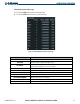
Setting a preset channel number:
1) On the XM Radio Page while listening to the Active Channel that you want to assign as a preset, select the
PRESETS Softkey.
2) Select the SET Softkey.
3) Select the preset key (PS1 - PS15) to assign a number to the active channel. Select the
MORE
Softkey as
necessary.
DATA LINK RECEIVER TROUBLESHOOTING
Although it is the responsibility of the facility that installed the Data Link Receiver to correct any hardware
problems, some quick troubleshooting steps can be performed to find the possible cause of a failure.
First, ensure that the owner/operator of the aircraft in which the Data Link Receiver is installed has subscribed
to XM Radio, and that the XM subscription has been activated. Perform a quick check of the circuit breakers
to ensure that power is applied to the Data Link Receiver. If a failure still exists, review the messages listed in
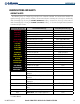
Table 8-1. The advisory messages may provide insight to a possible failure.
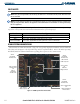
For troubleshooting purposes, the Status, Serial Number, and Software Version numbers for the Data Link
Receiver are displayed in the
LRU Information Box on the System Status Page (Figure 8-5).