
User Guide

190-00552-00 Rev. A
Garmin G1000 Pilot’s Guide for the Columbia 350/400
8-5
ADDITIONAL FEATURES
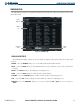
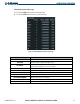
Selecting a category:
1) Select the CATGRY Softkey on the XM Radio Page.
2) Turn the small
FMS
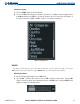
Knob to display the ‘Categories’ list (Figure 8-3). Highlight the desired category with the
small
FMS
Knob and press the
ENT
Key. Selecting ‘All Categories’ places the channels from ‘All Categories’ in
the Channels field (select the CAT + and CAT - Softkeys to cycle through the categories).
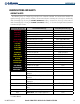
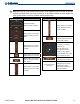
Figure 8-3 Categories List
VOLUME
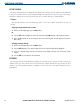
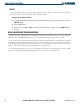
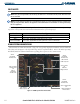
The Volume ‘control’ (Figure 8-4) sets the audio volume level, as well as mutes the audio. Selecting the
VOL Softkey brings up the volume bar graph, MUTE Softkey, and the volume control softkeys.
Adjusting the volume:
1) With the XM Radio Page displayed, select the VOL Softkey.
2) Select the VOL – Softkey to reduce volume or select the VOL + Softkey to increase volume. (Once the VOL
Softkey is selected, the volume can also be adjusted using the small FMS Knob). Selecting the MUTE Softkey
toggles the muting of the radio audio volume.
Figure 8-4 Volume Control