
User Guide

190-00552-00 Rev. A
Garmin G1000 Pilot’s Guide for the Columbia 350/400
8-3
ADDITIONAL FEATURES
XM RADIO PAGE
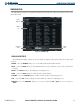
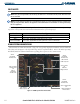
The XM Radio Page (Figure 8-2) provides information and control of the audio entertainment features of the
XM Satellite Radio.
Figure 8-2 XM Radio Page
Volume
Field
Categories
Field
Channel
List
Active
Channels
XM RADIO SOFTKEYS
The following XM Radio Softkeys are located below the display and provide control of the Data Link
Receiver:
RADIO – Select the RADIO Softkey to access the XM Satellite Radio Audio Functions.
INFO – Select the INFO Softkey to show XM Information, such as Radio IDs, Service Class, and Weather
Products.
DONE – The DONE Softkey is used during the activation process.
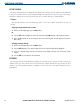
CHNL – Select the CHNL Softkey to allow selection of radio channels.
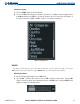
CATGRY
– Select the CATGRY Softkey to allow selection of radio categories (Figure 8-3).
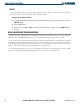
VOL – Select the VOL Softkey to adjust the audio volume or to mute the audio (Figure 8-4).
PRESETS – Select the PRESETS Softkey to access preset channels (PS1 - PS15) or to set a new preset
(SET).