
User Guide




190-00552-00 Rev. A
Garmin G1000 Pilot’s Guide for the Columbia 350/400
7-20
AUTOMATIC FLIGHT CONTROL SYSTEM
ENGAGING THE AUTOPILOT
NOTE: Autopilot engagement/disengagement is not equivalent to servo engagement/disengagement. Use
the CWS Button to disengage the pitch and roll servos while the autopilot remains active.
When the
AP
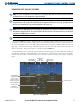
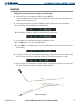
Key is pressed, the autopilot and flight director (if not already engaged) are activated. Engagement
is indicated by a green ‘AP’ annunciation in the center of the AFCS Status Box. The flight director engages in
Pitch and Roll Hold modes when initially activated.
Figure 7-17 Autopilot Engaged
Autopilot Engaged
CONTROL WHEEL STEERING
During autopilot operation, the aircraft may be hand-flown without disengaging the autopilot. Pressing and
holding the
CWS
Button disengages the pitch and roll servos from the flight control surfaces and allows the
aircraft to be hand-flown. At the same time, the flight director is synchronized to the aircraft attitude during
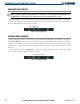
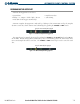
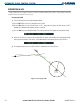
the maneuver. The ‘AP’ annunciation is temporarily replaced by ‘CWS’ in white for the duration of CWS
maneuvers.
In most scenarios, releasing the
CWS
Button reengages the autopilot with a new reference. Refer to the flight
director modes section for CWS behavior in each mode.
Figure 7-18 CWS Annunciation
Control Wheel Steering