
User Guide




190-00552-00 Rev. A
Garmin G1000 Pilot’s Guide for the Columbia 350/400
1-23
SYSTEM OVERVIEW
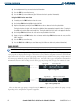
Selecting a page using the FMS Knob:
1) Turn the
large FMS
Knob until the desired page group is selected.
2)
Turn
the
small FMS
Knob until the desired page is selected.
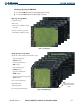
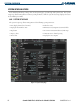
Figure 1-23 Map Pages
• Map Page Group (MAP)
Navigation Map
Traffic Map
Stormscope (Columbia 350 only,
optional)
Weather Data Link (
optional)
Terrain/TAWS (TAWS
optional)
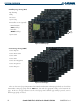
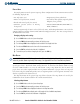
• Waypoint Page Group (WPT)
Airport/Procedures/Weather Information Pages
- Airport Information
(INFO Softkey)
- Departure Information
(DP Softkey)
- Arrival Information
(STAR Softkey)
- Approach Information
(APR Softkey)
- Weather Information (
optional)
(WX Softkey)
Intersection Information
NDB Information
VOR Information
User Waypoint Information
Figure 1-24 Waypoint Pages
Airport/Procedures/
Weather Information
Pages