
User Guide





190-00552-00 Rev. A
Garmin G1000 Pilot’s Guide for the Columbia 350/400
7-10
AUTOMATIC FLIGHT CONTROL SYSTEM
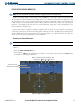
VERTICAL SPEED MODE (VS)
Vertical Speed Mode is activated by pressing the
VS
Key. The annunciation ‘VS’ appears in the active pitch
mode field, along with the Vertical Speed Reference to the right; the Vertical Speed Reference is also displayed
above or below the Vertical Speed Indicator, depending on whether the aircraft is climbing or descending.
In Vertical Speed Mode, the flight director acquires and maintains a Vertical Speed Reference as it climbs or
descends to the Selected Altitude (shown above the Altimeter). Current aircraft vertical speed becomes the
Vertical Speed Reference at the moment of Vertical Speed Mode engagement. A Vertical Speed Reference Bug
corresponding to the Vertical Speed Reference is shown on the indicator.
CHANGING THE VERTICAL SPEED REFERENCE
NOTE: Refer to the AFM for Vertical Speed Reference limits.
The Vertical Speed Reference (shown both in the AFCS Status Box and above/below the Vertical Speed
Indicator) may be changed:
• Using the
NOSE UP/NOSE DN
keys
• By pressing the
CWS
Button, hand-flying the aircraft to a new Vertical Speed Reference, then releasing the
CWS
Button
Figure 7-7 Vertical Speed Mode
Vertical Speed
Reference Bug
Selected Altitude
Command Bars
Indicate Climb
Vertical Speed
Mode Active
Vertical
Speed
Reference
Altitude Hold
Mode Armed
Vertical Speed
Reference