
User Guide





190-00552-00 Rev. A
Garmin G1000 Pilot’s Guide for the Columbia 350/400
6-43
HAZARD AVOIDANCE
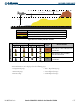
Color Terrain/Obstacle Location Alert Level Suggested Pilot Response
Red
Terrain/Obstacle above or within 100’
below current aircraft altitude.
WARNING
Initiate climb and/or turn away from
terrain/obstacle.
Yellow
Terrain/Obstacle between 100’ and
1000’ below current aircraft altitude.
CAUTION
Be aware of surroundings.
Be prepared to take action.
Black
Terrain/Obstacle is more than 1000’
below aircraft altitude.
NO DANGER
No action required.
Table 6-4 Terrain/Obstacle Colors and Suggested Pilot Response
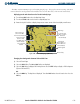
The MAP – TAWS Page is in the MAP group of pages. The TAWS Page has two view settings, 360° View
centered about the aircraft in the middle of the screen or ARC View, a 120° view of terrain ahead.
When selecting ARC view, the screen presentation of terrain ahead becomes larger and more prominent.
Displaying the TAWS Page and selecting the 360
˚
and ARC view:
1) Turn the large
FMS
Knob to select the Map Page Group.
2) Turn the small
FMS
Knob
to select the TAWS Page.
3) Select the
VIEW
Softkey. The
ARC
and
360
Softkeys are displayed.
4) Select the
360
Softkey to display a 360˚ viewing area or select the
ARC
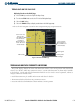
Softkey to display a 120˚ viewing area
(Figures 6-49 and 6-50).
OR:
5) Press the
MENU
Key. The Page Menu is displayed. Turn either
FMS
Knob to select the inactive view. Press the
ENT
Key.
6) Rotate the Joystick clockwise or counter-clockwise to display a larger or smaller area.
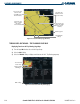
Figure 6-49 TAWS Page (360˚ View)
Map Range
Terrain Legend
GPS Altitude
Heading Mode
VIEW Softkey
Red Terrain Area
(Above or Within
100’ Below
Aircraft Altitude)
Yellow Terrain Area
(Between 100’
and 1000’ Below
Aircraft Altitude)
Black Terrain Area
(More Than 1000’
Below Aircraft
Altitude)