
User Guide





190-00552-00 Rev. A
Garmin G1000 Pilot’s Guide for the Columbia 350/400
6-41
HAZARD AVOIDANCE
TERRAIN DATA ON THE VNAV PAGE
Displaying Terrain on the VNAV Page:
1) Press the
FPL
Key to select the Flight Plan Page Group.
2) Turn the small
FMS
Knob to select the FPL–Vertical Navigation Page.
3) Select the
MAP
Softkey.
5) Select the
TERRAIN
Softkey to display terrain data on the VNAV page map.
Refer to the GPS Navigation Section for more Navigation Map Page setup instructions.
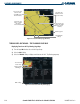
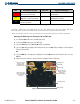
Figure 6-47 Terrain on VNAV Page
Terrain Legend
MAP Softkey
Terrain Symbol
and Range
Yellow Terrain Area
(Between 100’
and 1000’ Below
Aircraft Altitude)
Red Lighted
Obstacles (Above or
Within 100’ Below
Aircraft Altitude)
Yellow Unlighted
Obstacle (Between
100’ and 1000’ Below
Aircraft Altitude)
TERRAIN AND OBSTACLE PROXIMITY LIMITATIONS
The system displays altitudes of terrain and obstructions relative to the aircraft position and altitude with
reference to a database, which may contain inaccuracies. Terrain and obstructions are shown only if available
in the database. Terrain and obstacle information should be used as an aid to visual acquisition, and not to
navigate or maneuver around terrain.
• Not all obstructions may be available in the Terrain and Obstacle database
• The Terrain and Obstacle database may contain inaccuracies
• No terrain and obstacle information is shown without a 3D GPS position.