
User Guide


190-00552-00 Rev. A
Garmin G1000 Pilot’s Guide for the Columbia 350/400
6-35
HAZARD AVOIDANCE
6.3 TERRAIN AVOIDANCE
TOPOGRAPHIC DATA ON THE NAVIGATION MAP PAGE
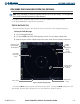
The Navigation Map Page displays various shades of topography land colors representing different levels of
land elevation similar to aeronautical sectional charts. The Navigation Map Page can display a topographic
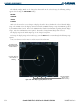
scale representing key points of terrain elevation in the different colors. Their elevation value is shown in
the Topography Scale (Figure 6-41). The data given in the Topography Scale indicate to the pilot, how high
the aircraft is flying above the ground. See the GPS Navigation Section for more Navigation Map Page setup
information.
Displaying topographic data on the Navigation Map Page:
1) With the Navigation Map displayed, select the
MAP
Softkey.
2) Select the
TOPO
Softkey. Topo data can also be displayed on the Navigation Map Page by using the ‘On/Off’
topo data map setup feature.
Maximum and Minimum
Elevation of topography
displayed in the map view
on the screen
Ground
elevation at
aircraft position
Aircraft altitude
Figure 6-41 Topography Scale
Range of
topography
elevation displayed
in the map view on
the screen