
User Guide


190-00552-00 Rev. A
Garmin G1000 Pilot’s Guide for the Columbia 350/400
6-33
HAZARD AVOIDANCE
RYAN 9900BX TRAFFIC ADVISORY SYSTEM (TAS) (OPTIONAL)
NOTE: Errors indicated by a failed screen prevent continued use of the TAS interface. See the applicable
Pilot’s Guide for detailed information on Failure Response.
The G1000 provides an optional display interface for the
Ryan 9900BX
Traffic Advisory System:
See the Ryan 9900BX Pilot’s Guide for more information.
TRAFFIC MAP PAGE (TAS)
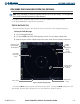
The Traffic Map Page (Figure 6-38) controls the source of traffic data on the Navigation Map Page.
Selecting the Traffic Map Page:
1) Select the Navigation Map Page.
2) Turn the small
FMS
Knob until the Traffic Map Page is selected. The system begins to display traffic.
5) Rotate the Joystick clockwise to display a larger area or rotate counter-clockwise to display a smaller area.
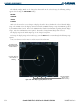
Figure 6-38 Traffic Map Page (TAS)
Proximity Traffic
500’ Above &
Climbing
Traffic Mode and
Altitude Display
Mode Indicator
Traffic Display
Range
Heading
Indicator
Off Scale
Traffic Advisory
Non-Threat
Traffic 4700’
Below
Altitude Mode
Softkey
Mute Softkey
Selecting the MUTE Softkey suspends aural alerts for 30 seconds. Selecting the MUTE Softkey twice will
allow hearing any Traffic Alerts that may have been issued while the system was muted.