
User Guide


190-00552-00 Rev. A
Garmin G1000 Pilot’s Guide for the Columbia 350/400
6-31
HAZARD AVOIDANCE
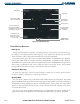
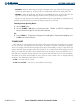
• STANDBY – When the Traffic Map Page displays ‘STANDBY’ in the status box located in the upper left
corner of the Traffic Map Page, the TIS system is in Standby Mode and does not display traffic data.
• OPERATE – When the Traffic Map Page displays ‘TIS OPERATING’ in the status box located in the
upper left corner of the Traffic Map Page, the TIS system is operating and can display traffic.
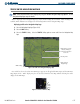
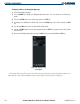
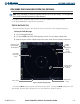
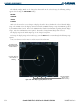
The pilot can switch between the Standby (STANDBY) and Operate (ON) Modes to manually override
automatic operation using the Page Menu or softkeys (Figures 6-37 and 6-38).
Switching between Operating Modes:
1) Select the
MODE
Softkey.
2) Select the
STANDBY
or
ON
Softkey to switch between modes. ‘STANDBY’ or ‘OPERATE’ is displayed in the
status box located in the upper left corner of the Traffic Map Page,
OR:
3) Press the
MENU
Key. The Page Menu is displayed with ‘Standby Mode’ or ‘Operate Mode’ highlighted. Press
the
ENT
Key on the desired selection.
TIS AUDIO ALERT
A TIS audio alert is generated whenever the number of TAs on the Traffic Map Page display increases from
one scan to the next. The limiting to TAs only reduces the amount of “nuisance” alerting due to proximate
aircraft. For example, when the first TA is displayed, the pilot is alerted audibly. So long as a single TA aircraft
remains on the TIS display, no further audio alert is generated. If a second (or more) TA aircraft appear on the
display, a new audio alert is sounded. If the number of TAs on the TIS display decreases and then increases, a
new audio alert is sounded. The TIS audio alert is also generated whenever TIS service becomes unavailable.
The volume of the audio alert (including the choice between a male or female voice) is configured during
installation. The following TIS audio alerts are available:
• “Traffic” – TIS traffic alert is received.
• “Traffic Not Available” – TIS service is not available or out of range.