
User Guide


Garmin G1000 Pilot’s Guide for the Columbia 350/400
190-00552-00 Rev. A6-30
HAZARD AVOIDANCE
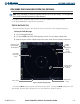
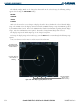
Traffic Advisory,
Out of Range
Non-Threat Traffic
(1600’ Above &
Climbing)
Map Range
Aircraft Symbol
Traffic Mode
Figure 6-37 Traffic Map Page (TIS)
Proximity Advisory at
current aircraft altitude,
level flight & moving in
the direction of the line
Traffic Advisory (400’
Above, Descending)
Traffic Banner, last
data update is older
than 6 sec. resulting
in Coast mode
STANDBY and
OPERATE Softkeys
TRAFFIC MAP PAGE OPERATIONS
Power-Up Test
The TIS interface performs an automatic test during power-up. If the system passes the power-up test,
the standby screen is displayed on the Traffic Map Page. If the system passes the power-up test, and the
aircraft is airborne, traffic is displayed on the Traffic Page in the Operating Mode.
If the system fails the power up test, the ‘NO DATA’, ‘DATA FAILED’, or ‘FAILED’ message is displayed.
Contact your Garmin dealer for corrective action if the ‘DATA FAILED’, or ‘FAILED’ message is displayed.
The ‘FAILED’ message indicates the GTX 33 transponder has failed. The ‘DATA FAILED’ message indicates
data is being received from the GTX 33 but a failure was detected in the data stream. The ‘NO DATA’
message indicates that data is not being received from the GTX 33 transponder.
Changing the Map Range
To change the map range, turn the Joystick clockwise to zoom out, or turn the Joystick counter-
clockwise to zoom in. Map ranges are 2 nm, 6 nm, and 12 nm.
Operating Mode
Once the aircraft is airborne the system switches from Standby Mode to Operating Mode. The G1000
displays ‘OPERATE’ in the upper left-hand corner and begins to display traffic on the Traffic or Map Page.
The TIS Traffic Advisory (TA) alerts the pilot to an intruding aircraft. When a yellow circle traffic symbol
appears or a voice warning is announced, begin a visual search for the intruder. Maintain visual contact
to avoid the other aircraft.
Once the aircraft is on the ground (determined by system configuration at the time of installation) the
system switches from Operating Mode to Standby Mode. The Traffic Map Page displays ‘STANDBY’.