
User Guide


190-00552-00 Rev. A
Garmin G1000 Pilot’s Guide for the Columbia 350/400
6-27
HAZARD AVOIDANCE
TRAFFIC ON THE NAVIGATION MAP PAGE
NOTE: Traffic and terrain data can be displayed by using the ‘On/Off’ Navigation Map Page Option. See the
Navigation Map Page setup for details.
Traffic is displayed on the Navigation Map Page only if aircraft heading data is available. When heading is not
available, Traffic Advisories are displayed as non-bearing banners on the Navigation Map Page.
Displaying traffic on the Navigation Map Page:
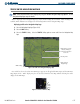
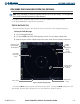
1) Select the Navigation Map Page (Figure 6-34).
2) Select the MAP Softkey.
3) Select the
TRAFFIC
Softkey. Select the
TRAFFIC
Softkey again to remove traffic from the Navigation Map
Page.
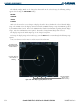
Aircraft Symbol
Figure 6-34 Traffic on the Navigation Map Page (TIS)
Traffic Advisory at same
altitude, climbing &
moving in the direction
of the line
Traffic Symbol &
Display Range
MAP Softkey
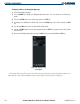
Once traffic has been selected on one MFD Page it appears on all applicable MFD Pages and the PFD Inset
Map (Figure 6-35). Traffic display may also be deselected from the Inset Map without affecting the traffic
display on the MFD maps.
Figure 6-35 Traffic on PFD Inset Map
Range
Traffic
Symbol
TA