
User Guide






190-00552-00 Rev. A
Garmin G1000 Pilot’s Guide for the Columbia 350/400
6-11
HAZARD AVOIDANCE
XM WEATHER ON THE NAVIGATION MAP PAGE
WARNING: Use of XM weather for hazardous weather penetration is not recommended. Weather information
provided by XM Radio Service is approved only for weather avoidance, not penetration.
NOTE: The Stormscope Menu Options are shown only when the Stormscope unit is installed. Stormscope is
not a GDL 69A Weather Product.
NOTE: The NEXRAD Option and the TOPO, TERRAIN, and STORMSCOPE Options are mutually exclusive.
When NEXRAD is activated, TOPO and/or TERRAIN and/or STORMSCOPE are turned off. XM Lightning and
the STORMSCOPE Option are also mutually exclusive.
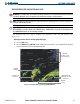
The Navigation Map Page displays NEXRAD, Cell Movement, TFRs, and XM Lightning data
(Figure 6-13).
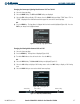
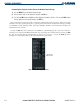
Displaying weather data on the Navigation Map Page:
1) Select the
MAP
Softkey.
2) Select the
NEXRAD
and/or
XM LTNG
Softkey to display the desired weather. Select the applicable Softkey again
to remove weather data from the Navigation Map Page.
Figure 6-13 Navigation Map Page Displaying NEXRAD Weather
NEXRAD
Softkey
NEXRAD
Weather
NEXRAD
Products, Storm
Legend, and Age
NEXRAD and XM
Lightning Icons, 800
NM Range
Cell Movement
Indication