
User Guide






190-00552-00 Rev. A
Garmin G1000 Pilot’s Guide for the Columbia 350/400
6-9
HAZARD AVOIDANCE
XM WEATHER (OPTIONAL)
NOTE: Before the GDL 69A can be used, it must be activated by XM Satellite Radio. The GDL 69A XM
Satellite Radio Activation Instructions delivered with the aircraft contain important information required to
initiate the XM satellite radio subscription for the GDL 69A.
NOTE: Temporary Flight Restrictions (TFRs) are displayed on all pages. Radar coverage is always displayed
with NEXRAD data.
The optional Garmin GDL 69A receiver interfaces with the G1000 to bring XM Weather and XM Digital Audio
Entertainment. XM Weather and XM Radio operate in the S-band frequency range to provide continuous uplink
capabilities at any altitude throughout North America. See the Additional Features section for information on
XM Digital Audio Entertainment.
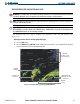
XM weather information provided by the GDL 69A is displayed on the following MFD Maps and Pages:
• Navigation Map Page (
NEXRAD and XM Lightning only)
• Nearest Pages (NEXRAD and XM Lightning only)
• Weather Data Link Page (complete XM Weather capability)
• Weather Information Page - part of the Waypoint Airport Information Page (METAR and TAF information
only)
• Flight Planning Maps (NEXRAD and XM Lightning only)
• AUX – Trip Planning Map (NEXRAD and XM Lightning only)
XM weather information is also displayed on the Primary Flight Display Inset Map. Complete weather
products include the following:
• Graphical NEXRAD Data (NEXRAD)
• Graphical METAR Data (METAR)
• Textual METAR Data
• Textual Terminal Aerodrome Forecasts (TAF)
• City Forecast Data
• Graphical Wind Data (WIND)
• Graphical Echo Tops (ECHO TOP)
• Graphical Cloud Tops (CLD TOP)
• Graphical Lightning Strikes (XM LTNG)
• Graphical Storm Cell Movement (CELL MOV)
• NEXRAD Radar Coverage (displayed with NEXRAD
data)
• SIGMETs/AIRMETs (SIG/AIR)
• Surface Analysis including City Forecasts (SFC)
• County Warnings (COUNTY)
• Freezing Levels (FRZ LVL)
• Hurricane Track (CYCLONE)
• Temporary Flight Restrictions (TFR)