
User Guide






190-00552-00 Rev. A
Garmin G1000 Pilot’s Guide for the Columbia 350/400
6-7
HAZARD AVOIDANCE
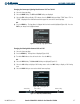
Changing the Stormscope Lightning Mode between ‘Cell’ and ‘Strike’:
1) Select the Stormscope Page.
2) Select the
MODE
Softkey. The
CELL
and
STRIKE
Softkeys are displayed.
3) Select the
CELL
Softkey to display ‘CELL’ data or select the
STRIKE
Softkey to display ‘STRIKE’ data. ‘CELL’ or
‘STRIKE’ is displayed in the mode box located in the upper left corner of the Stormscope Page.
OR:
4) Press the
MENU
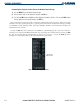
Key. The Page Menu is displayed with the inactive mode highlighted (Figure 6-9). Press the
ENT
Key to change to the highlighted mode.
Figure 6-9 Stormscope Page Options Menu
Changing the Viewing Mode between 360
˚
and 120˚:
1) Select the Stormscope Page.
2) Press the
MENU
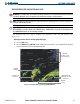
Key. The Page Menu is displayed (Figure 6-10).
3) Turn either
FMS
Knob to select the inactive view. Press the
ENT
Key.
OR:
4) Select the
VIEW
Softkey. The
360
and
ARC
Softkeys are displayed (Figure 6-11).
5) Select the 360 Softkey to display a 360˚ viewing area or select the ARC Softkey to display a 120˚ viewing
area.
6) Select the BACK Softkey to return to the default Stormscope Page.
Figure 6-10 Selecting 120˚ Arc
Figure 6-11 360, ARC, and BACK Softkeys
ARC Softkey
360 Softkey
BACK Softkey