
User Guide




Garmin G1000 Pilot’s Guide for the Columbia 350/400
190-00552-00 Rev. A6-6
HAZARD AVOIDANCE
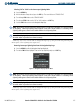
Removing Stormscope lightning data from the Navigation Map Page:
1) Press the
MENU
Key with the Navigation Map Page displayed.
2) Turn
either
FMS
Knob to highlight ‘Clear Stormscope Lightning’ and press the
ENT
Key.
STORMSCOPE PAGE
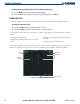
Stormscope lightning data is displayed on the Stormscope Page in addition to the Navigation Map Page.
Selecting the Stormscope Page:
1) Turn the large
FMS
Knob until the Map Page group is selected.
2) Turn the small
FMS
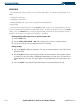
Knob until the Stormscope Page is selected (Figure 6-8).
The following Stormscope Page operations are available using softkeys, Page Menu Options, or knob
operation:
• Changing the Display Range
• Changing the Lightning Mode between Cell and
Strike
• Changing the Viewing Mode between 360° and
120° ARC
• Clearing Stormscope Lightning Data
To change the display range on the Stormscope Page, turn the Joystick clockwise to zoom out or counter-
clockwise to zoom in. Display ranges are 25 nm, 25 and 50 nm, 50 and 100 nm, and 100 and 200 nm.
Figure 6-8 Stormscope Page
Mode
Strike Rate
Clear Softkey
Lightning
Strikes
Map Range