
User Guide




190-00552-00 Rev. A
Garmin G1000 Pilot’s Guide for the Columbia 350/400
6-5
HAZARD AVOIDANCE
Selecting ‘Cell’ or ‘Strike’ as the Stormscope Lightning Mode:
1) Press the
MENU
Key.
2) With the Weather Group selected, press the
ENT
Key. The cursor flashes on ‘STRMSCP LTNG’.
3) Turn the large
FMS
Knob to select ‘STRMSCP MODE’.
4) Turn the small
FMS
Knob to select ‘Cell’ or ‘Strike’ and press the
ENT
Key.
5) Push the
FMS
Knob to return to the Navigation Map Page.
NOTE: Occasionally clearing Stormscope lightning data is a good way to determine if a storm is building
or dissipating. Stormscope lightning data reappears faster and in larger numbers in a building storm.
Lightning data appears slower and in smaller numbers in a dissipating storm.
NOTE: If heading input is lost, strikes and/or cells must be cleared manually after each turn to ensure that
the strike and/or cell positions are shown accurately.
Stormscope data can be cleared from the Navigation Map Page by using the third Navigation Map Page
Menu Option, ‘Clear Lightning Data’ (Figure 6-7).
Removing Stormscope lightning data from the Navigation Map Page:
1) Press the
MENU
Key with the Navigation Map Page displayed.
2) Turn
either
FMS
Knob to highlight ‘Clear Stormscope Lightning’ and press the
ENT
Key.
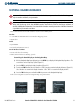
Figure 6-7 Navigation Map Page Options Menu
NOTE: Occasionally clearing Stormscope lightning data is a good way to determine if a storm is building
or dissipating. Stormscope lightning data reappears faster and in larger numbers in a building storm.
Lightning data appears slower and in smaller numbers in a dissipating storm.
NOTE: If heading input is lost, strikes and/or cells must be cleared manually after each turn to ensure that
the strike and/or cell positions are shown accurately.
Stormscope data can be cleared from the Navigation Map Page by using the third Navigation Map Page
Menu Option, ‘Clear Lightning Data’ (Figure 6-7).