
User Guide




190-00552-00 Rev. A
Garmin G1000 Pilot’s Guide for the Columbia 350/400
6-3
HAZARD AVOIDANCE
STORMSCOPE ON THE NAVIGATION MAP PAGE
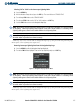
Displaying Stormscope lightning data on the Navigation Map Page:
1) Select the
MAP
Softkey.
2) Select the
STRMSCP
Softkey. Selecting the
STRMSCP
Softkey again removes Stormscope Lightning Data from
the Navigation Map Page.
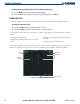
In normal operation, the mode and rate are displayed in the top right corner of the Navigation Map Page.
The mode is described by the word ‘STRIKE’ when in Strike Mode, or ‘CELL’ when in Cell Mode.
Cell Mode uses a clustering program to detect lightning and identify clusters of electrical activity that
indicate cells. Cell Mode is most useful during periods of heavy storm activity. Displaying cell data during
heavy storms helps determine where the storm cells are located. In Strike Mode, the Stormscope detects and
maps individual lightning strikes, showing sporadic electrical activity.
Figure 6-4 Navigation Map Page Displaying Stormscope Lightning Data
Lightning
Strikes
Lightning Cell
Mode and Rate
Stormscope
Symbol and
Display Range
Stormscope
Softkey