
User Guide



190-00552-00 Rev. A
Garmin G1000 Pilot’s Guide for the Columbia 350/400
1-16
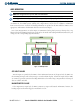
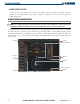
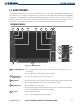
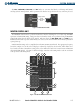
SYSTEM OVERVIEW
1
FPL Key
Displays flight plan information
2
Direct-to Key ( )
Activates the direct-to function and allows the user to enter a destination waypoint
and establish a direct course to the selected destination (specified by identifier,
chosen from the active route)
3
MENU Key
Displays a context-sensitive list of options for accessing additional features or making
setting changes
4
PROC Key
Gives access to IFR departure procedures (DPs), arrival procedures (STARs), and
approach procedures (IAPs) for a flight plan or selected airport
5
Joystick
Turn to change map range
Press to activate Map Pointer for map panning
6
Alphanumeric Keys Allow data entry (rather than using the FMS Knob to select characters/numbers)
7
BKSP Key
Moves cursor back one character space and removes last character entered
8
SPC Key
Adds a space character
9
ENT Key
Validates or confirms a menu selection or data entry
10
CLR Key
Erases information, cancels entries, or removes menus
Press and hold to display the MFD Navigation Map Page (MFD only).
11
SEL Key
Arrows move light blue Softkey Selection Box (Figure 1-14) on selected display
Press the center to activate the selected softkey
12
Decimal Key
Enters a decimal point character
13
Plus-Minus (±) Key
Toggles entry between the + and - characters
14
NAV Key
Selects/deselects NAV radio tuning mode on the MFD/PFD Control Unit
15
COM Key
Selects/deselects COM radio tuning mode on the MFD/PFD Control Unit
16
Frequency Transfer
Key
(EMERG)
Transfers between active and standby selected COM or NAV tuning frequencies
Press and hold two seconds to tune the emergency frequency (121.5 MHz)
automatically into the active frequency field
17
PFD Key
When selected, the MFD/PFD Control Unit can be used to access PFD functions
18
MFD Key
When selected, the MFD/PFD Control Unit can be used to access MFD functions
(default display control mode)
19
FMS/NAV-COM
Knob
NAV/COM Tuning Modes: Acts as the NAV or COM Knob
PFD/MFD Control Modes
: Acts as the FMS Knob