
User Guide






5-131190-00552-00 Rev. A
Garmin G1000 Pilot’s Guide for the Columbia 350/400
GPS NAVIGATION
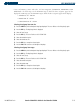
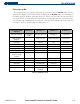
• States and Provinces, Rivers and Lakes, and User Waypoints (STATE/PROV, RIVER/LAKE, USER
WAYPOINT) - the label range sets the maximum range at which the three categories appear on the
display. The zoom range sets the maximum range at which the three categories appear on the display:
• STATE/PROV: off - 1500 nm
• RIVER/LAKE off - 500 nm
• USER WAYPOINT: off - 300 nm
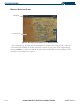
Selecting a land group item text size:
1) Press the
MENU
Key with the Navigation Map Page displayed. The cursor flashes on the ‘Map Setup’ option.
2) Press the
ENT
Key. The Map Setup Menu is displayed.
3) Select the ‘Land’ group.
4) Press the
ENT
Key. The cursor flashes on the ‘LAT/LON’ field.
5) Select the desired land option.
6) Select the desired text size.
7) Press the
ENT
Key to accept the selected option.
8) Press the
FMS
Knob
to return to the Navigation Map Page.
Selecting a land group item range:
1) Press the
MENU
Key with the Navigation Map Page displayed. The cursor flashes on the ‘Map Setup’ option.
2) Press the
ENT
Key. The Map Setup Menu is displayed.
3) Select the ‘Land’ group.
4) Press the
ENT
Key. The cursor flashes on the ‘LAT/LON’ field.
5) Select the desired Land option.
6) Select the desired range.
7) Press the
ENT
Key to accept the selected option.
8) Press the
FMS
Knob
to return to the Navigation Map Page.