
User Guide





5-125190-00552-00 Rev. A
Garmin G1000 Pilot’s Guide for the Columbia 350/400
GPS NAVIGATION
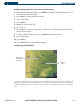
Enabling/disabling XM lightning on the Navigation Map Page:
1) With the ‘Weather’ group displayed, select ‘XM LTNG’.
2) Select ‘On’ (display XM lightning) or ‘Off’ (remove XM lightning).
3) Press the
ENT
Key.
4) Press the
FMS
Knob to return to the Navigation Map Page.
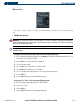
Selecting an XM lightning symbol zoom range:
1) With the ‘Weather’ group displayed, select ‘XM LTNG’ range field.
2) Select the desired range.
3) Press the
ENT
Key.
4) Press the
FMS
Knob to return to the Navigation Map Page.
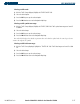
Enabling/disabling XM lightning cell movement:
1) With the ‘Weather’ group displayed, select ‘CELL MOVEMENT’.
2) Select ‘On’ or ‘Off’.
3) Press the
ENT
Key.
4) Press the
FMS
Knob to return to the Navigation Map Page.