
User Guide




5-118 190-00552-00 Rev. A
Garmin G1000 Pilot’s Guide for the Columbia 350/400
GPS NAVIGATION
Wind Vector
Wind Vector
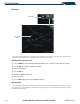
Figure 5-83 Nav Range Ring
Nav Range
Ring
The wind vector (Figure 5-83) is displayed in the upper right corner of the map and displays wind
direction and speed (in knots). Wind direction is indicated by an arrow.
Enabling/disabling the wind vector:
1) Press the
MENU
Key with the Navigation Map Page displayed. The cursor flashes on the ‘Map Setup’ option.
2) Press the
ENT
Key. The Map Setup Menu is displayed.
3) Select the ‘Map’ group.
4) Press the
ENT
Key.
5) Highlight the ‘WIND VECTOR’ field.
6) Select ‘On’ or ‘Off’.
7) Press the
FMS
Knob
to return to the Navigation Map Page.
Nav Range Ring
The Nav Range Ring (Figure 5-82) shows the direction of travel (ground track) on a rotating compass
card. The range of the Nav Ring is determined by the map range: 125 feet (500 feet map range) to 500
nm (2000 nm map range).