
User Guide




5-115190-00552-00 Rev. A
Garmin G1000 Pilot’s Guide for the Columbia 350/400
GPS NAVIGATION
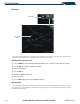
MAP GROUP
Figure 5-81 Map Group
Orientation
There are four map orientation selections: North up, Track up, DTK up, and HDG up. The orientation
default setting is ‘North Up’.
• North up fixes the top of the map to a north heading.
• Track up adjusts the top of the map display to the current ground track.
• Desired Track Up (DTK up) fixes the top of the map display to the desired course.
• Heading Up (HDG up) fixes the top of the map display to the current aircraft heading.
Changing the map orientation:
1) With the Navigation Map Page displayed, press the
MENU
Key. The cursor flashes on the ‘Map Setup’ option.
2) Press the
ENT
Key. The Map Setup Menu is displayed.
3) Select the ‘ORIENTATION’ field. Select the desired orientation and press the
ENT
Key.
4) Press the
FMS
Knob
to return to the Navigation Map Page.