
User Guide




5-114 190-00552-00 Rev. A
Garmin G1000 Pilot’s Guide for the Columbia 350/400
GPS NAVIGATION
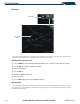
• Heading indication
• Aircraft icon representing present position
• Icons for enabled map features
• Track vector
• Topography scale
• Fuel range ring
• Topography data
NAVIGATION MAP SETUP
NOTE: Refer to Appendix G for a full description and interpretation of aviation map data.
Selecting the Navigation Map Page:
1) Use the large FMS Knob to select the Map Page Group.
2) Use the small FMS Knob to select the first rectangular page icon. The page group name and page title are
displayed below the Navigation Data Bar: MAP – NAVIGATION MAP.
OR:
3) Press and momentarily hold the
CLR
(DFLT MAP) Key.
The map can be customized using the map setup groups listed in the Navigation Map Page Menu (Figure
5-80). To display the menu, press the
MENU Key (with the Navigation Map Page displayed). There are four
setup groups:
• Map
• Weather (optional)
• Traffic
• Aviation
• Land
Map Setup
Option
Navigation Map
Page Menu
Figure 5-80 Navigation Map Page Menu