
User Guide





5-101190-00552-00 Rev. A
Garmin G1000 Pilot’s Guide for the Columbia 350/400
GPS NAVIGATION
AUX - UTILITY
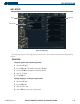
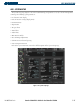
Figure 5-70 Utility Page
Trip Statistics
Scheduler
Timers
The Utility Page (Figure 5-70) displays timers, trip statistics, and scheduler information for flight planning
purposes.
OPERATIONS
Setting the generic timer direction (up, down):
1) Select the Utility Page.
2) Press the
FMS
Knob
. The ‘GENERIC’ timer field is highlighted.
3) Turn the
small FMS
Knob to display the ‘UP/DOWN’ window.
4) Select ‘UP’ or ‘DOWN’
5) Press the
ENT
Key.
Starting, stopping, or resetting the generic timer:
1) Select the Utility Page.
2) Press the
FMS
Knob
.
3) Select the ‘START?’ field.
4) Press the
ENT
Key to start, stop, or reset the timer.