
User Guide






5-81190-00552-00 Rev. A
Garmin G1000 Pilot’s Guide for the Columbia 350/400
GPS NAVIGATION
Selecting and loading an approach from the Nearest Airports Page:
1) Select the desired nearest airport.
2) Select the
APR
Softkey located at the bottom of the display. The LD APR (load approach) Softkey becomes
available.
3) Select the desired approach.
4) Select the
LD APR
Softkey. The Approach Loading Page is displayed with the transitions field highlighted.
5) Select the desired transition.
6) Press the
ENT
Key. The ‘LOAD?’ field is highlighted.
7) Press the
ENT
Key to load the approach. If navigating a flight plan previous to loading this approach, the G1000
will continue navigating the flight plan until the approach is activated.
8) Highlight the ‘ACTIVATE’ field.
9) Press the
ENT
Key to activate the approach and begin navigating to the IAP.
10) If the approach is not approved for GPS, a ‘NOT APPROVED FOR GPS’ messages is displayed with ‘YES’
highlighted. Press the
ENT
Key to acknowledge the message (or select ‘NO’).
11) Press the
ENT
Key to return to the Approach Loading Page.
MENU OPERATIONS
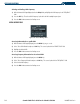
Figure 5-52 Nearest Airport Page Menu
Accessing information for a specific airport:
1) With the Nearest Airports Page displayed, press the
MENU
Key (Figure 5-52).
2) Select ‘Select Airport Window’ and press the
ENT
Key. The cursor is placed in the ‘NEAREST AIRPORTS’ field.
3) Highlight the desired airport.
4) Press the
FMS
Knob
to remove the flashing cursor.