
User Guide




5-69
GPS NAVIGATION
190-00552-00 Rev. A
Garmin G1000 Pilot’s Guide for the Columbia 350/400
WPT - INTERSECTION INFORMATION
NOTE: The VOR displayed on the Intersection Information Page is the nearest VOR, not necessarily the VOR
used to define the intersection.
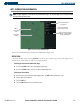
Figure 5-44 Intersection Information Page
Nearest VOR Information;
Identifier, Symbol, Radial
Angle, and Distance
Intersection Identifier
and Symbol
Map of
Surrounding
Area
Intersection
Symbol
Intersection General
Location and Position
The Intersection Information Page displays the information in Figure 5-44:
OPERATIONS
To change the map range, turn the Joystick to the left to select a lower range, turn it to the right to select
a higher range. Intersections can only be selected by identifier.
Selecting the Intersection Information Page:
1) Use the large FMS Knob to select the Waypoint Page Group.
2) Use the small FMS Knob to select the second rectangular page icon.
Selecting an intersection:
1) With the Intersection Information Page displayed, press the
FMS
Knob
to activate the cursor.
2) Enter a name for the identifier.
3) Press
the
ENT
Key.
4) Press the
FMS
Knob
to remove the flashing cursor.