
User Guide





5-59
GPS NAVIGATION
190-00552-00 Rev. A
Garmin G1000 Pilot’s Guide for the Columbia 350/400
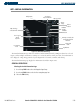
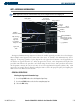
WPT – ARRIVAL INFORMATION
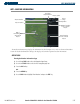
Figure 5-41 Arrival Information Page
Associated
Airport Identifier
Facility Name
Airport
Location
Available
Arrivals
Runways Served by the
Selected Arrival and
Transition
List of Legs in
Arrival
Sequence
Map Showing
Selected Arrival
Available
Transitions
Airport Symbol
Airport
Usage
Leg Starting
Point
Leg Desired
Track
Leg Distance
The Arrival Information Page shows the available Standard Terminal Arrival (STAR) procedures for a selected
airport. Where multiple transitions or runways are associated with the arrival procedure, that information is
also displayed. A map image provides a layout diagram for each arrival, transition, and runway.
The Arrival Information page displays the information described in Figure 5-40.
GENERAL OPERATIONS
Selecting the Arrival Information Page:
1) Use the large FMS Knob to select the Waypoint Page Group.
2) Use the small
FMS Knob to select the first rectangular page icon.
3) Select the STAR Softkey.