
User Guide





5-26
GPS NAVIGATION
190-00552-00 Rev. A
Garmin G1000 Pilot’s Guide for the Columbia 350/400
ACTIVATE LEG
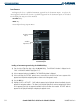
Figure 5-20 Activate Leg Command
‘Activate Leg’ selects the highlighted leg as the “active leg” (the flight plan leg which is currently used for
navigation guidance). A flight plan along a specific leg can be activated using two possible methods:
• ACT LEG Softkey
• Active Flight Plan Page Options Menu
Activating a flight plan along a specific leg using the ACT LEG Softkey:
1) Highlight the desired destination waypoint.
2) Select the
ACT LEG
Softkey. A confirmation window is displayed (Figure 5-20).
3) With ‘Activate’ highlighted, press the
ENT
Key. To cancel the operation, select ‘CANCEL’ and press the
ENT
Key.
Activating a flight plan along a specific leg using the page menu:
1) Highlight the desired destination waypoint.
2) Press the
MENU
Key.
3) Select ‘Activate Leg’.
4) Press the
ENT
Key. A confirmation window is displayed.
5) With ‘Activate’ highlighted, press the
ENT
Key.
SAVING (STORING) THE ACTIVE FLIGHT PLAN
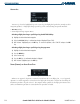
Figure 5-21 Store Flight Plan Confirmation Box
Whenever an approach, departure, or arrival is loaded into the active flight plan, a set of approach,
departure or arrival waypoints is inserted into the flight plan along with a header line describing the
instrument procedure the pilot selected. The original enroute portion of the flight plan remains active
(unless an instrument procedure is activated) when the procedure is loaded.