
User Guide





5-24
GPS NAVIGATION
190-00552-00 Rev. A
Garmin G1000 Pilot’s Guide for the Columbia 350/400
7) Highlight ‘LOAD?’ or ‘ACTIVATE?’. ‘LOAD’ adds the approach to the flight plan without immediately using the
approach for navigation guidance. This allows for the original flight plan to continue navigating until cleared for
the approach, but keeps the approach available for quick activation when needed. ‘Activate’ adds the approach
to the flight plan and begins navigating the approach course.
8) If the approach is not approved for GPS, a ‘NOT APPROVED FOR GPS’ messages is displayed with ‘YES’
highlighted. Press the
ENT
Key to acknowledge the message. To cancel the approach, select ‘NO’ and press the
ENT
Key.
LOAD ARRIVAL
A published standard terminal arrival route (STAR) for the destination airport can be loaded into the
flight plan using one of three methods:
• LD STAR Softkey
• PROC Key
• Active Flight Plan Page Options Menu
The loaded arrival replaces the current arrival with the new selection.
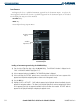
Figure 5-19 Available Arrivals
Available Arrivals
for the Destination
Airport
Loading an arrival procedure using the LD STAR Softkey:
1) From the Active Flight Plan Page, select the
LD STAR
Softkey.
2) The ARRIVAL window is displayed on the ‘PROC – ARRIVAL LOADING’ Page (Figure 5-19).
3) Select an arrival.
4) Press the
ENT
Key. The TRANSITION window is displayed.
5) Select a transition.
6) Press the
ENT
Key. The RUNWAY window may be displayed. If so, select a runway.
7) Press the
ENT
Key.
8) With ‘LOAD’ highlighted, press the
ENT
Key. The arrival procedure is displayed as part of the overall flight plan
and is placed in front of the enroute flight plan.