
User Guide




5-8
GPS NAVIGATION
190-00552-00 Rev. A
Garmin G1000 Pilot’s Guide for the Columbia 350/400
5.3 DIRECT-TO-NAVIGATION (PFD)
NOTE: Section 5.14 describes the PFD Inset Map and PFD Windows. It is recommended that the user read
this section before beginning GPS navigation operations on the PFD.
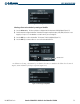
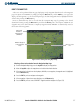
Figure 5-10 Direct-to Window
Waypoint Symbol
Facility Name
Identifier
City, State
Flight Plan
Waypoint List
Nearest
Waypoint List
Bearing From and
Distance to Waypoint
Latitude/Longitude
Course to Selected Waypoint
OPERATIONS
A direct-to waypoint can be selected in the following ways:
• By identifier, waypoint location or facility name
• From a list of waypoints in the active flight plan
• From a list of 25 nearest airports
The PFD Direct-to Window is enabled and disabled by pressing the Direct-to Key. The currently selected
waypoint displays the information shown in Figure 5-10.
Selecting a direct-to by identifier:
1) Press the
Direct-to
Key.
2) Enter the desired waypoint identifier.
3) Press the
ENT
Key to confirm the selection.
4) Press the
ENT
Key again to activate the direct-to.
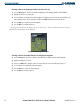
Selecting a direct-to by city or facility name:
1) Press the
Direct-to
Key.
2) Highlight the city field (to the right of the identifier) or facility field (directly below the identifier) field.
3) Enter the city (to the right of the identifier field) or the facility (directly below the identifier field).
4) Once the desired city or facility name is displayed, press the
ENT
Key to confirm the selection.
5) Press the
ENT
Key to activate the direct-to.