
User Guide




5-2 190-00552-00 Rev. A
Garmin G1000 Pilot’s Guide for the Columbia 350/400
5.2 DIRECT-TO-NAVIGATION (MFD)
NOTE: The Direct-to Window Inset Map (Figure 5-1) range is adjustable. To change the map range, turn the
Joystick to the left to select a lower range, turn it to the right to select a higher range.
The “direct-to” navigation feature provides a quick method of setting a GPS course to a destination waypoint.
Once a direct-to is activated, the G1000 establishes a point-to-point course line from the present position to
the selected direct-to destination. Course guidance is provided until the direct-to is cancelled or replaced by a
new destination.
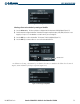
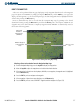
Figure 5-1 MFD Direct-to Navigation
List of Waypoints and
Twenty-Five Nearest Airports
in Active Flight Plan
Position
Direct-To Waypoint
Identifier, Facility,
Symbol, City
Course to Direct-To
Waypoint
Activate Annunciation
Inset Map Showing
Direct-To Waypoint
Location
Direct-to
Course Line
Direct-to
Destination
Waypoint
Bearing to Waypoint
from Present Position
Distance to Waypoint
from Present Position
Direct-to Window
SELECTING A DIRECT-TO WAYPOINT
A direct-to waypoint can be selected in the following ways:
• By identifier, facility, or the name of a city
• From the active flight plan or nearest airports list
• From a waypoint field, waypoint page, or highlight shortcut
GPS NAVIGATION