
User Guide




190-00552-00 Rev. A
Garmin G1000 Pilot’s Guide for the Columbia 350/400
4-39
AUDIO PANEL AND CNS
ALTITUDE MODE (AUTOMATIC OR MANUAL)
Altitude Mode is automatically selected when the aircraft becomes airborne. Altitude Mode may also be
selected manually by selecting the
ALT
Softkey.
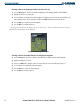
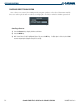
If Altitude Mode is selected, a green ALT indication and transponder code appear in the mode field of the
Transponder Data Box, and all transponder replies requesting altitude information are provided with pressure
altitude information.
Figure 4-46 Altitude Mode
REPLY STATUS
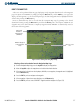
When the Transponder sends replies to interrogations, an ‘R’ indication appears momentarily in the reply
status field of the Transponder Data Box.
Figure 4-47 Reply Indication
CODE SELECTION
ENTERING A CODE
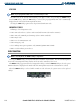
NOTE: When entering a code, select the BKSP (backspace) Softkey to back up and change code digits.
A total of 4096 discrete identification codes can be selected with the Code Selection Softkeys.
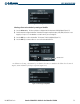
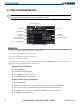
Entering a transponder code:
1) Select the
XPDR
Softkey to display the transponder Mode Selection Softkeys.
2) Select the
CODE
Softkey to display the transponder Code Selection Softkeys, for digit entry.
3) Select the digit softkeys to enter the code in the code field.
OR:
Use the numeric keys on the MFD/PFD Control Unit to enter the transponder code.
When entering the code, the next digit in sequence must be selected within 10 seconds, or the entry
is cancelled and restored to the previous code. Five seconds after the fourth digit has been entered, the
transponder code becomes active.
Figure 4-48 Entering a Code