
User Guide






190-00552-00 Rev. A
Garmin G1000 Pilot’s Guide for the Columbia 350/400
4-31
AUDIO PANEL AND CNS
NRST – NEAREST VOR PAGE
The Nearest VOR Page displays a list of VORs with bearing and distance information, plus the VOR
frequency.
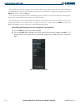
Loading a VOR frequency into the Standby NAV Frequency Field:
1) Press the
FMS
Knob to activate the selection cursor on the Nearest VOR Page.
2) Turn the
FMS
Knob to scroll through the list of nearest VORs until the desired VOR is highlighted.
3) Select the
FREQ
Softkey to activate the selection cursor in the Frequency Window and press the
ENT
Key to load
the frequency into the Standby Tuning Field of the NAV Frequency Box.
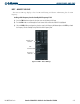
Figure 4-36 NRST – Nearest VOR Page
Nashville VOR
Identifier
Frequency of
BNA VOR
VOR
Information