
User Guide



Garmin G1000 Pilot’s Guide for the Columbia 350/400
190-00552-00 Rev. A4-18
AUDIO PANEL AND CNS
VOLUME
Radio volume level can be adjusted from 0 to 100% using the
VOL/PUSH SQ
Knob for COM or
VOL/
PUSH ID
Knob for NAV. Turning the knob clockwise increases volume, counterclockwise decreases volume.
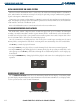
When adjusting, the level is displayed in place of the standby frequencies. Volume level indication remains
for two seconds after the change.
NAV Volume Level
Remains for Two Seconds
Figure 4-18 NAV and COM Volume Levels
COM Volume Level
Remains for Two Seconds
MANUAL FREQUENCY TUNING
The
COM
and
NAV
knobs on the PFD and MFD can be used for manual COM and NAV radio tuning. The
frequencies are tuned in the standby fields.
• The MHz frequency digits are tuned with the large
COM
and
NAV
knobs.
• The kHz frequency digits are tuned with the small
COM
and
NAV
knobs.
Turning the knobs clockwise increases frequency. Turning the knobs counterclockwise decreases frequency.
COM and NAV frequencies can also be tuned using either the numeric keys or the FMS/NAV-COM Knob
on the MFD/PFD Control Unit (refer to the System Overview for a description of the Control Unit). The
FMS/
NAV-COM Knob and the
Frequency Transfer
Key operate similarly to the controls in the top corners of the
Primary Flight Display (PFD) and Multi Function Display (MFD). The COM or NAV Frequency Box selected
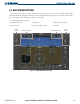
for tuning is outlined by a light blue Tuning Selection Box (Figure 4-19). The Tuning Selection Box flashes for
a few seconds to indicate Control Unit tuning activity. Selection of a different display control or radio tuning
mode results in cancellation of the previous radio tuning mode.
Figure 4-19 Frequency Tuning Using the MFD/PFD Control Unit
Blue Border
Surrounds COM
Tuning Boxes