
User Guide




Garmin G1000 Pilot’s Guide for the Cessna Citation Mustang
190-00494-00 Rev. B3-8
EICAS
3.2 CREW ALERTING SYSTEM (CAS)
NOTE: Aural alerts associated with abnormal conditions and advisories are managed through the audio
panels. Refer to the Audio Panel and CNS Section for more information.
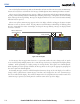
The Crew Alerting System (CAS) Display is located in the lower left corner of the EICAS Display (on the MFD)
under normal display conditions. Up to 14 messages can be displayed; when more than 14 messages accumulate,
the scrolling CAS softkeys become available.
When CAS messages are present while in reversionary mode, the CAS Window appears on the display along
with the flight instruments and EIS. The window size increases to fit up to 14 CAS messages; if more than 14
messages are generated, the messages can be scrolled through using the
CAS softkeys (two left-most softkeys).
Figure 3-14 CAS Messages
Normal Mode
CAS
Display
Reversionary Mode
CAS
Window
CAS MESSAGES AND PRIORITIZATION
NOTE: Information on CAS messages in this pilot’s guide is always superseded by the AFM.
CAS messages are grouped by criticality (warning, caution, advisory) and sorted by order of appearance (most
recent messages on top). The color of the message is based on its urgency and on required action:
• Warning (red) – Immediate crew awareness and action required; Master Warning triggered
• Caution (yellow) – Immediate crew awareness and possible future corrective action required; Master Caution
triggered
• Advisory (white) – Crew awareness required and subsequent action may be required
Any CAS messages that come up when the system is first powered on are considered already acknowledged.
They do not flash or trigger the Master Warning or Master Caution. CAS messages listed in Table 3-2 are shown
in the acknowledged state (text corresponding to criticality on a black background).