
User Guide




Garmin G1000 Pilot’s Guide for the Cessna Citation Mustang
190-00494-00 Rev. B3-2
EICAS
In the event of a display failure, depending on the failed display(s), the remaining display(s) may be re-
configured to present Primary Flight Display (PFD) symbology together with EICAS information (refer to the
System Overview for more information about reversionary mode).
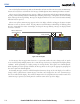
In reversionary mode, the data is pared down to a single column on any display. The N1, N2, and ITT
indicators are presented in the same way, but all other parameters are shown as readouts only. The following are
not shown:
• Total fuel
• Cabin altitude rate
• Destination elevation
• Battery current
• Aileron and rudder trim
The CAS is moved to a window on the right side of the display. CAS messages are treated in the same way as
they are during normal display. Messages are prioritized by criticality.
Figure 3-2 Reversionary Mode
CAS Window
EIS
Display