
User Guide




190-00494-00 Rev. B
Garmin G1000 Pilot’s Guide for the Cessna Citation Mustang
2-19
FLIGHT INSTRUMENTS
COURSE DEVIATION INDICATOR (CDI)
NOTE:
The GPS CDI is removed from the display when operating in Dead Reckoning Mode.
The Course Deviation Indicator (CDI) moves left or right from the course pointer along a lateral deviation
scale to display aircraft position relative to the course. If the course deviation data is not valid, the CDI is not
displayed. The CDI has the same angular limits as a mechanical CDI when coupled to a VOR or localizer
(LOC). When coupled to GPS, the full scale limits for the CDI are defined by a GPS-derived distance. If the
CDI exceeds the maximum deviation on the scale (two dots) while coupled to GPS, the crosstrack error (XTK)
is displayed below the white aircraft symbol.
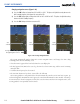
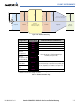
Figure 2-30 Course Deviation Indicator
CDI
Scale
Crosstrack
Error
Flight
Phase
Navigation
Source
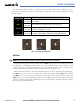
When GPS is the selected navigation source, the flight plan legs are sequenced automatically and
annunciations appear on the HSI for the flight phase. If the current leg in the flight plan is a heading leg,
‘HDG LEG’ is annunciated in magenta beneath the aircraft symbol.
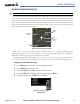
The current GPS CDI scale setting is displayed as ‘System CDI’ on the AUX - System Setup Page and the full-
scale deflection setting may also be changed (2.0 nm, 1.0 nm, 0.3 nm, or Auto) from this page (
Figure 2-31
).
Changing the selected GPS CDI setting:
1) Use the FMS Knob to select the AUX - System Setup Page on the MFD.
2) Press the FMS Knob to activate the cursor.
3) Turn the
large FMS
Knob to highlight ‘Selected’ in the ‘GPS CDI’ box.
4) Turn the small FMS Knob to highlight the desired setting and press the ENT Key.
5) To cancel the selection, press the FMS Knob or the CLR Key.
Figure 2-31 System Setup Page,
GPS CDI Settings