
User Guide




190-00494-00 Rev. B
Garmin G1000 Pilot’s Guide for the Cessna Citation Mustang
2-15
FLIGHT INSTRUMENTS
TURN RATE INDICATOR
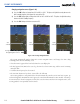
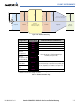
The Turn Rate Indicator is located directly above the rotating compass card. Tick marks to the left and right
of the lubber line denote half-standard and standard turn rates. A magenta Turn Rate Trend Vector shows the
current turn rate. The end of the trend vector gives the heading predicted in 6 seconds, based on the present
turn rate. At rates greater than 4 deg/sec, an arrowhead appears at the end of the magenta trend vector and
the prediction is no longer valid (Figure 2-23).
A standard-rate turn is shown on the indicator by the trend vector stopping at the standard turn rate tick
mark, corresponding to a predicted heading of 18˚ from the current heading (Figure 2-24).
Figure 2-24 Standard-Rate Turn Indication
Turn Rate
Trend Vector
Figure 2-23 Turn Rate Indicator and Trend Vector
Half-std Turn Rate
Std Turn Rate
Arrow Shown
for Turn Rate >
4 deg/sec
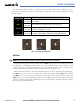
NAVIGATION SOURCE
The HSI can display two sources of navigation: GPS or NAV (VOR, localizer). The CDI Softkey cycles
through the navigation sources. Color indicates the current navigation source: magenta (for GPS) or green
(for VOR and LOC); the Selected Course readout also follows these color indications. If the same VOR/LOC
navigation source is selected on both PFDs, the navigation source annunciation turns yellow on both displays
(unless synchronized from the PFD Setup Menu; see Course Deviation Indicator description).
Figure 2-25 Navigation Sources
Navigation Source
Selected on Both PFDs