
User Guide




190-00494-00 Rev. B
Garmin G1000 Pilot’s Guide for the Cessna Citation Mustang
1-44
SYSTEM OVERVIEW
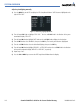
Deleting a scheduler message
1) Use the FMS Knob to select the AUX - Utility Page.
2) Press the FMS Knob momentarily to activate the flashing cursor.
3) Turn the large FMS Knob to highlight the name field of the scheduler message to be deleted.
4) Press the CLR Key to clear the message text. If the CLR Key is pressed again, the message is restored.
5) Press the ENT Key to confirm message deletion.
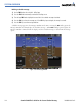
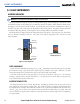
Scheduler messages appear in the Messages Window on the PFD. Pressing the
MSG Softkey opens the
Messages Window and acknowledges the scheduler message. When MSG Softkey is pressed again, the
Messages Window is removed from the display and the scheduler message is deleted from the message
queue.
Figure 1-35 PFD Message Window