
User Guide






Garmin G1000 Pilot’s Guide for the Cessna Citation Mustang
190-00494-00 Rev. B 8-49
ADDITIONAL FEATURES
USING XM RADIO
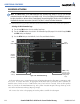
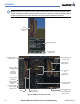
The XM Radio Page provides information and control of the audio entertainment features of the XM Satellite
Radio.
Selecting the XM Radio Page:
1) Turn the large
FMS
Knob to select the Auxiliary Page Group.
2) Turn the small
FMS
Knob to select the displayed AUX - XM Information Page.
3) Press the
RADIO
Softkey to show the XM Radio Page where audio entertainment is controlled.
Figure 8-58 XM Radio Page
Categories
Field
Channel
List
Active
Channels