
User Guide





Garmin G1000 Pilot’s Guide for the Cessna Citation Mustang
190-00494-00 Rev. B8-38
ADDITIONAL FEATURES
CHART OPTIONS
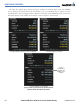
Pressing the CHRT OPT Softkey displays the next level of softkeys, the chart options level (Figure 8-35).
Pressing the
ALL Softkey shows the entire chart on the screen. By pressing the ALL Softkey from another
view, the approach chart is shown in its entirety.
Entire Chart
Shown
Figure 8-48 Airport Information Page, ALL View Selected