
User Guide





Garmin G1000 Pilot’s Guide for the Cessna Citation Mustang
190-00494-00 Rev. B 8-33
ADDITIONAL FEATURES
SHOW CHART OPTIONS
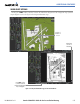
Pressing the CHRT Softkey switches between the FliteCharts diagram and the navigation map (SafeTaxi
airport diagram at selected ranges) on the Airport Information Page.
Position of
Aircraft on
Screen
Aircraft Not
Shown on
FliteCharts
Figure 8-41 Airport Information Page, SafeTaxi and FliteCharts
Press
CHRT
Softkey
to Switch Between
SafeTaxi and FliteCharts
Airport Diagram