
User Guide







Garmin G1000 Pilot’s Guide for the Cessna Citation Mustang
190-00494-00 Rev. B 8-23
ADDITIONAL FEATURES
DAY/NIGHT VIEW
Selecting Day, Night, or Automatic View:
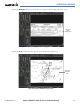
1) While viewing a terminal chart press the MENU Key to display the Page Menu OPTIONS.
2) Turn the large
FMS
Knob to highlight the ‘Chart Setup’ Menu Option and press the
ENT
Key.
Figure 8-29 Waypoint Information Page, OPTIONS Menu
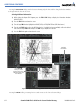
3) Turn the large
FMS
Knob to move between the ‘FULL SCREEN’ and ‘COLOR SCHEME’ Options (Figure 8-30).
4) Turn the small
FMS
Knob to choose between the ‘On’ and ‘Off’ Full Screen Options.
5) Turn the small
FMS
Knob to choose between ‘Day’, ‘Auto’, and ‘Night’ Options.
6) In Auto Mode, turn the large
FMS
Knob to select the percentage field and change percentage with the small
FMS
Knob. The percentage of change is the day/night crossover point based on backlighting intensity.
NOTE
: Once an adjustment is made to the percentage field in Auto mode, the chart must be redrawn
(zoomed in or out, or another chart selected) before the switch from Day to Night is seen.
7) Press the
FMS
Knob when finished to remove the Chart Setup Menu.