
User Guide







Garmin G1000 Pilot’s Guide for the Cessna Citation Mustang
190-00494-00 Rev. B 8-21
ADDITIONAL FEATURES
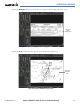
If the zoom range has been adjusted to view a small area of the chart, pressing the FIT WIDTH Softkey
changes the chart size to fit the available screen width.
Press
FIT WDTH
Softkey to Show
Full Chart Width
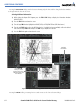
Figure 8-27 Airport Information Page, FIT WDTH Softkey Selected
Position of
Aircraft on
Chart