
User Guide





Garmin G1000 Pilot’s Guide for the Cessna Citation Mustang
190-00494-00 Rev. B8-2
ADDITIONAL FEATURES
Any map page that displays the navigation view can also show the SafeTaxi airport layout within the maximum
configured range. The following is a list of pages where the SafeTaxi feature can be seen:
• Navigation Map Page
• Inset map
• Weather Datalink Page
• Airport Information Page
• Intersection Information Page
• NDB Information Page
• VOR Information Page
• User Waypoint Information Page
• Trip Planning Page
• Nearest Pages
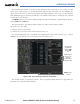
During ground operations the aircraft’s position is displayed in reference to taxiways and runways. In the
example shown in Figure 8-1, the aircraft is on taxiway Juliet approaching runway 20 Left.
Figure 8-1 SafeTaxi Depiction on the Navigation Map Page
DCLTR
Softkey
Removes Airport
Runway and
Taxiway Markings
Zoom In or
Out With
the
Joystick
Airport
Features
Aircraft
Position
Runway
Number
Taxiway
Identification
Pressing the DCLTR Softkey (declutter) once removes the taxiway markings and airport identification labels.
Pressing the DCLTR Softkey twice removes VOR station ID, the VOR symbol, and intersection names if within
the airport plan view. Pressing the DCLTR Softkey a third time removes the airport runway layout, unless the
airport in view is part of an active route structure. Pressing the DCLTR Softkey again cycles back to the original
map detail. Refer to Map Declutter Levels in Section 5.